

Description
Download ATF Cleaner – clean temporary files, optimize system performance, lightweight tool, no installation required, improve download speeds, browser cleanup
Overview
ATF Cleaner is a lightweight utility designed to help users streamline their system performance by removing unwanted temporary files. As a portable application, it operates without requiring installation, making it an ideal choice for users who prefer minimal software footprint and immediate functionality. The tool targets a common digital challenge: the accumulation of temporary data that can slow down system responsiveness, reduce download speeds, and degrade browser performance over time. By offering a focused cleanup solution, ATF Cleaner addresses these issues efficiently, particularly for users who value speed and simplicity in system maintenance.
Targeted primarily at individuals seeking a no-frills approach to system optimization, ATF Cleaner caters to both casual users and those with moderate technical knowledge. Its design philosophy emphasizes accessibility and immediate usability, allowing users to initiate a cleanup with minimal effort. The app is especially beneficial in scenarios where users need to quickly clear system clutter without modifying system settings or installing additional software. In the broader context of productivity tools, ATF Cleaner fills a niche as a dedicated, single-purpose utility that enhances system efficiency without complexity.
Developed by Ryan J. Boudreaux and first released on March 24, 2008, the application has maintained a consistent focus on core functionality. While the developer did not provide additional technical details, the app’s enduring presence suggests reliability and consistent performance over time. Real-world use cases include preparing a system for large downloads, improving browser responsiveness, or clearing cache before troubleshooting performance issues.
Key Features & Functionality
ATF Cleaner delivers a streamlined set of features tailored to system cleanup and browser optimization. The application’s core functionality revolves around identifying and removing temporary files that accumulate during regular device usage. These files often include cache data, cookies, browsing history, and other transient files that can hinder performance if left unchecked.
- No Installation Required: The tool runs directly from the downloaded file, eliminating the need for setup or system modifications. This portability makes it suitable for use on shared or restricted devices.
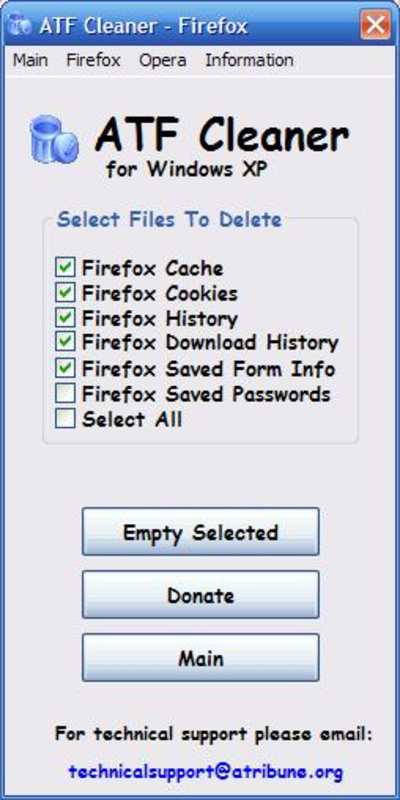
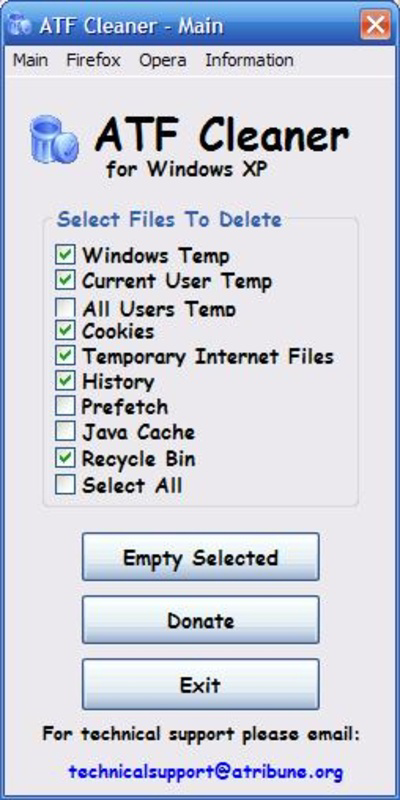
- User-Friendly Interface: With a clean layout featuring just three tabs—system options, browser settings, and cleanup controls—the interface ensures intuitive navigation. Users can quickly locate and select the types of files to remove.
- Customizable Cleaning Options: Users can choose specific file types for deletion, such as cookies, temporary internet files, or browser history. This level of control allows for tailored cleanups based on individual needs.
- Multi-Browser Support: The app includes dedicated options for popular browsers like Firefox and Opera, enabling users to clean browser-specific data efficiently and maintain consistent performance across different platforms.
For example, a user preparing for a high-speed download can run ATF Cleaner to clear temporary files that may be consuming bandwidth or storage. Similarly, someone experiencing slow browser performance can use the tool to remove cached data and cookies that may be causing lag. The flexibility and precision of these features make ATF Cleaner a practical utility for routine system maintenance.
Interface, UX & Performance
The interface of ATF Cleaner is designed with simplicity and efficiency in mind. It features a minimalistic layout with clearly labeled tabs, allowing users to navigate between system-wide and browser-specific cleanup settings with ease. The visual style is straightforward, prioritizing function over aesthetics, which aligns with its utility-focused purpose. Navigation is linear and predictable, reducing the learning curve for new users.
Although the developer did not list formal performance metrics, the tool’s lightweight nature—only 1.1 MB in size—suggests it operates efficiently with minimal system resource usage. This makes it suitable for use on older or low-spec devices where performance overhead is a concern. The application launches quickly and completes cleanup tasks in a timely manner, contributing to a responsive user experience.
Responsiveness is maintained across different device categories, though specific compatibility details were not disclosed. The app’s portability ensures it can be run on various systems without leaving behind residual files or registry entries. Stability appears consistent, given its long-standing presence since 2008. Users can expect reliable execution during cleanup sessions without unexpected crashes or freezes.
Platform Compatibility & Technical Requirements
ATF Cleaner is designed for the Windows platform and operates on Windows-based systems. The application’s version is 1.0.0, with a file size of 1.1 MB, indicating a compact and efficient footprint. The developer did not specify minimum OS requirements, nor did they list compatibility with specific Windows versions beyond the general platform.
Given its release date of March 24, 2008, the tool is likely compatible with older Windows systems such as Windows XP, Vista, and 7, though this has not been officially confirmed. Modern Windows versions (Windows 10 and 11) may also support the application, but this depends on backward compatibility and system settings. Users are advised to test the tool in their environment to ensure proper functionality.
Since ATF Cleaner is a portable application, it does not require installation, making it easy to transfer and use across different devices. The absence of installation also means no changes to system settings or registry entries, which enhances security and reduces the risk of unintended side effects.
Pros and Cons
- Lightweight and portable—no installation required
- Simple, intuitive interface suitable for all user levels
- Supports multiple browsers including Firefox and Opera
- Customizable cleanup options for targeted file removal
- Free to download and use
- Not available for mobile platforms (Android or iOS)
- Developer did not provide OS compatibility details
- Limited to Windows operating system
- Interface lacks advanced customization or scheduling features
- Release date is from 2008—may not include modern security updates
FAQ
Is ATF Cleaner safe to use?
Yes, ATF Cleaner is a free and portable tool that does not install software or modify system settings. It only removes temporary files, making it safe for regular use when used as intended.
Can I use ATF Cleaner on mobile devices?
No, ATF Cleaner is designed for Windows systems only. It is not available for Android or iOS platforms.
Does ATF Cleaner require admin rights to run?
The developer did not specify whether administrative privileges are required. However, as a portable application, it may run without elevated permissions on most systems.
How often should I run ATF Cleaner?
Users can run the tool as needed—such as before large downloads or when experiencing slow performance. There is no set frequency, as it depends on individual usage patterns.
Is ATF Cleaner updated regularly?
There is no information available about update frequency. The last known release was in 2008, so users should exercise caution and ensure their system is protected from potential vulnerabilities.
Final Thoughts
ATF Cleaner remains a viable option for users seeking a no-frills solution to system clutter and browser performance issues. Its lightweight design, portability, and straightforward interface make it an effective tool for quick cleanups without the overhead of installation. While it lacks modern features like scheduling or advanced analytics, its core purpose is fulfilled with precision and reliability.
Individuals who prioritize simplicity, privacy, and immediate results will find value in this utility. It is especially useful for those using older systems or working in environments where software installation is restricted. Despite its age, the app continues to serve its intended function effectively.
Download ATF Cleaner now
Guides & Tutorials for ATF Cleaner
How to install ATF Cleaner
- Click the Preview / Download button above.
- Once redirected, accept the terms and click Install.
- Wait for the ATF Cleaner download to finish on your device.
How to use ATF Cleaner
This software is primarily used for its core features described above. Open the app after installation to explore its capabilities.
User Reviews for ATF Cleaner 0
No reviews found


